
When you add a manager, apps like Teams and Outlook will be able to show organizational charts to users. Note that each user can only have one manager at a time.
- Navigate to the Active Users page in the Microsoft 365 Admin Center: https://admin.microsoft.com/AdminPortal/Home#/users
- Select the User by name
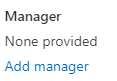
- Click Add manager under Manager:
- Choose manager by entering Name or Email address:

- Click Save Changes:

- Done! You will see this green banner when successfully added:
