
- Navigate to the Active Users page in the Microsoft 365 Admin Center: https://admin.microsoft.com/AdminPortal/Home#/users
- Select the User by name
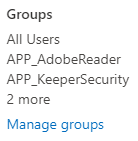
- Click Manage groups under Groups:
- Note, if this is a new user, you will notice there are some groups that have been automatically assigned. These are done automatically based on policies. Please do not remove them.
- Click Assign memberships
 Choose groups as requested by the manager and click Add.Done! You will see this green banner when successfully added:
Microsoft Office 365 - Adding/Changing Groups Print
Created by: Odell Duppins
Modified on: Thu, Aug 22, 2024 at 2:51 PM
Did you find it helpful? Yes No
Send feedbackSorry we couldn't be helpful. Help us improve this article with your feedback.